
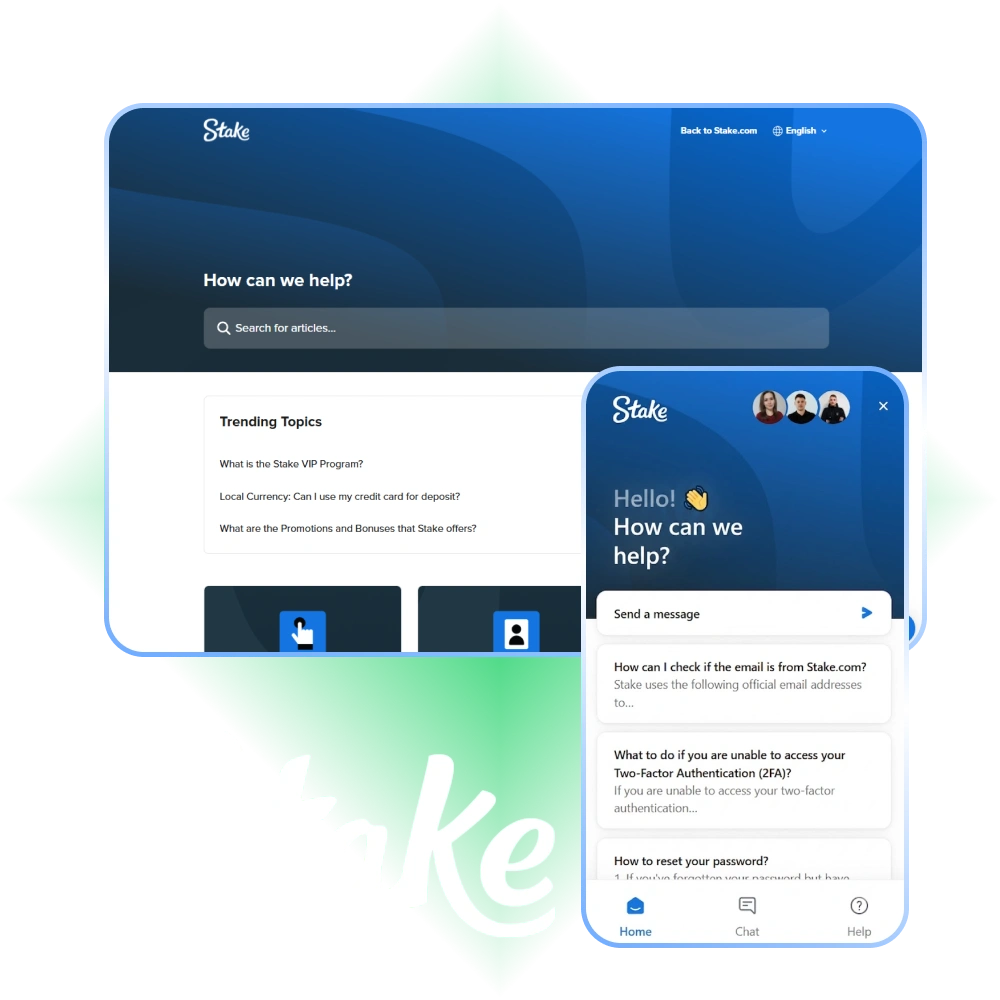
Stake India Support and Customer Service
The Stake support team is available 24 hours a day, 7 days a week to assist you with account queries, payment issues, technical difficulties, and general questions. You can reach customer support through live chat, email, and social messaging platforms, with responses available in English and Hindi. Most live chat queries receive a reply within a few minutes, while email responses typically arrive within 24 hours.
Get Instant Help via Live Chat
Live chat is the fastest way to connect with the Stake customer support team. It is built directly into the website and app, so you can access help without leaving the page you are on.
How to Access Live Chat
To start a chat session:
- Log in to your account on the Stake website or mobile app.
- Click the chat icon located at the bottom right corner of the screen.
- Select your query category from the options provided.
- Type your message and a support agent will join the conversation shortly.
When to Use Live Chat
Live chat works best for:
- Login and account access problems.
- Deposit and withdrawal queries.
- Bonus and promotion clarifications.
- General account questions that need a quick answer.
- Real-time guidance through a specific process on the site.
Availability and Languages
- Live support is available 24/7, every day of the year.
- Support is available in English, with Hindi assistance available on request.
- Average first response time is under 2 minutes during standard hours.
Tips for Faster Responses
- Be specific about your issue from the first message.
- Include your registered email address or username.
- Attach a screenshot if there is a visible error on your screen.
- Avoid sending multiple separate messages before an agent responds.
Contact Stake via Support Email
Email is the recommended channel for detailed queries, formal complaints, and situations that require documentation. It gives you space to explain your issue thoroughly and attach relevant files.
How to Send an Email
To contact Stake customer service by email:
- Compose your message to the relevant support address listed on the official Stake website under the Help or Contact section.
- Use a clear subject line that describes your issue (for example: “Withdrawal Pending – Account Verification”).
- Include your registered username, account email, and a full description of the problem.
- Attach any relevant files such as screenshots, transaction IDs, or identity documents.
When to Use Email
Email support is best suited for:
- KYC document submission and verification follow-ups.
- Formal account complaints or dispute resolutions.
- Responsible gambling self-exclusion requests.
- Situations where you need a written record of the conversation.
- Complex payment issues requiring review by a specialist team.
Response Timeframes
- Standard email replies are sent within 24 to 48 hours.
- Queries involving account verification or documentation may take slightly longer.
- You will receive a confirmation email once your ticket is received.
Tips for a Faster Email Response
- Write a descriptive subject line so the query reaches the right department.
- Keep the body of the email focused and structured.
- Avoid sending duplicate emails, as this can delay processing.
- Reference any earlier ticket or case numbers if following up.
Stake Helpline Number and Phone Support
Phone support gives you a direct line to a customer service representative for situations that need verbal explanation or immediate escalation. It is particularly useful when written communication has not resolved an issue.
How Phone Support Works
To use phone support:
- Check the official Stake website for the current helpline number listed for your region.
- Call during the available support hours shown on the contact page.
- Be prepared to verify your identity by providing your registered email or username.
- Clearly describe your issue at the start of the call to reduce handling time.
When to Use Phone Support
Phone support is ideal for:
- Urgent account access issues.
- Escalating unresolved complaints.
- Sensitive account matters that require verbal confirmation.
- Situations where you prefer speaking to a person directly.
Contact Information
- Helpline numbers and availability hours are listed on the official Stake contact page.
- Regional helpline numbers may be available depending on your location.
- Check whether a toll-free number is available for users calling from India.
Expected Wait Times
- Call wait times vary depending on volume, with peak hours typically in the evening.
- Most calls are connected to an agent within 5 to 10 minutes.
- Complex issues may require a callback or follow-up by email.
Tips for Efficient Phone Support
- Have your account details ready before calling.
- Call during off-peak hours, such as mid-morning or early afternoon, for shorter wait times.
- Take note of the agent name and case reference number for follow-up purposes.
Technical Support for Account and Game Issues
For problems that go beyond general queries, a dedicated technical support team is available to investigate platform errors, payment failures, and account difficulties.
What Technical Support Covers
This team handles specialised issues including:
- Login failures and two-factor authentication errors.
- Game loading problems or mid-session disconnections.
- Deposit not appearing in your account balance.
- Withdrawal processing failures or delays.
- App crashes or compatibility issues on Android and iOS.
- Unexplained account restrictions or access blocks.
How to Access Technical Support
- Start with live chat and select the technical issue category.
- If the issue requires investigation, the chat agent will escalate your case to the technical team.
- For complex problems, submit a detailed email to the technical support address listed on the official Stake website.
Response Timeframes
- Minor technical issues are often resolved during a live chat session.
- Issues requiring back-end investigation typically take 24 to 72 hours.
- Payment discrepancies may take up to 5 business days depending on the payment provider.
Tips for Faster Technical Resolution
- Take a screenshot of any error message or code displayed on screen.
- Note the exact time and date the issue occurred.
- Specify the device you were using (mobile, desktop, app version).
- Mention the browser name and version if you are using the website.
- Include your account username and transaction ID where applicable.
- Avoid clearing your browser cache or reinstalling the app before reporting, as this can remove useful diagnostic information.
VIP and Priority Customer Support at Stake
High-tier players and VIP members have access to a dedicated priority support service with faster response times and personalised assistance. This is a core part of the Stake VIP programme.
How VIP Support Works
- VIP members are assigned a dedicated account manager or host.
- Priority live support connects VIP users to senior agents with shorter wait times.
- A dedicated contact line or private chat channel may be available depending on your VIP tier.
- Your account manager can be contacted directly through the messaging method provided at enrolment.
Who Qualifies for Priority Support
- Players who have reached a qualifying VIP or Loyalty tier.
- High-volume players identified by the Stake VIP team.
- Users who have received a direct invitation to the VIP programme.
Types of Issues Given Priority Treatment
- Large withdrawal approvals and processing.
- Account reinstatement after a suspension or restriction.
- Bonus and cashback adjustments specific to VIP terms.
- Personalised gaming or event requests.
Response Timeframes for VIP Members
- Priority live chat responses are typically under 1 minute.
- Email queries from VIP members are handled within a few hours.
- Dedicated account managers aim to respond within the same business day.
How to Access and Maximise VIP Support
- Check your account dashboard to see your current VIP or Loyalty level.
- Contact the general customer service team to enquire about VIP eligibility.
- Once enrolled, use the dedicated contact details provided by your account manager.
- Keep your account in good standing to maintain VIP status and priority access.
Updated:
Social Media and Messaging Platform Support
Stake maintains an active presence across several social media and messaging platforms, giving you additional ways to get in touch with the support team or stay informed about updates.
Available Platforms
You can reach or follow Stake on:
When to Use Social Messaging
Social and messaging platforms work best for:
Response Timeframes
Tips for Effective Communication on Social Platforms